 customerservice@affordablediabeticdirect.com
 (862) 201-5354
- Updated September 18, 2026
- 15-minute read
- Reviewed by Affordable Diabetic Direct Editorial Team
⚡ Quick Answer
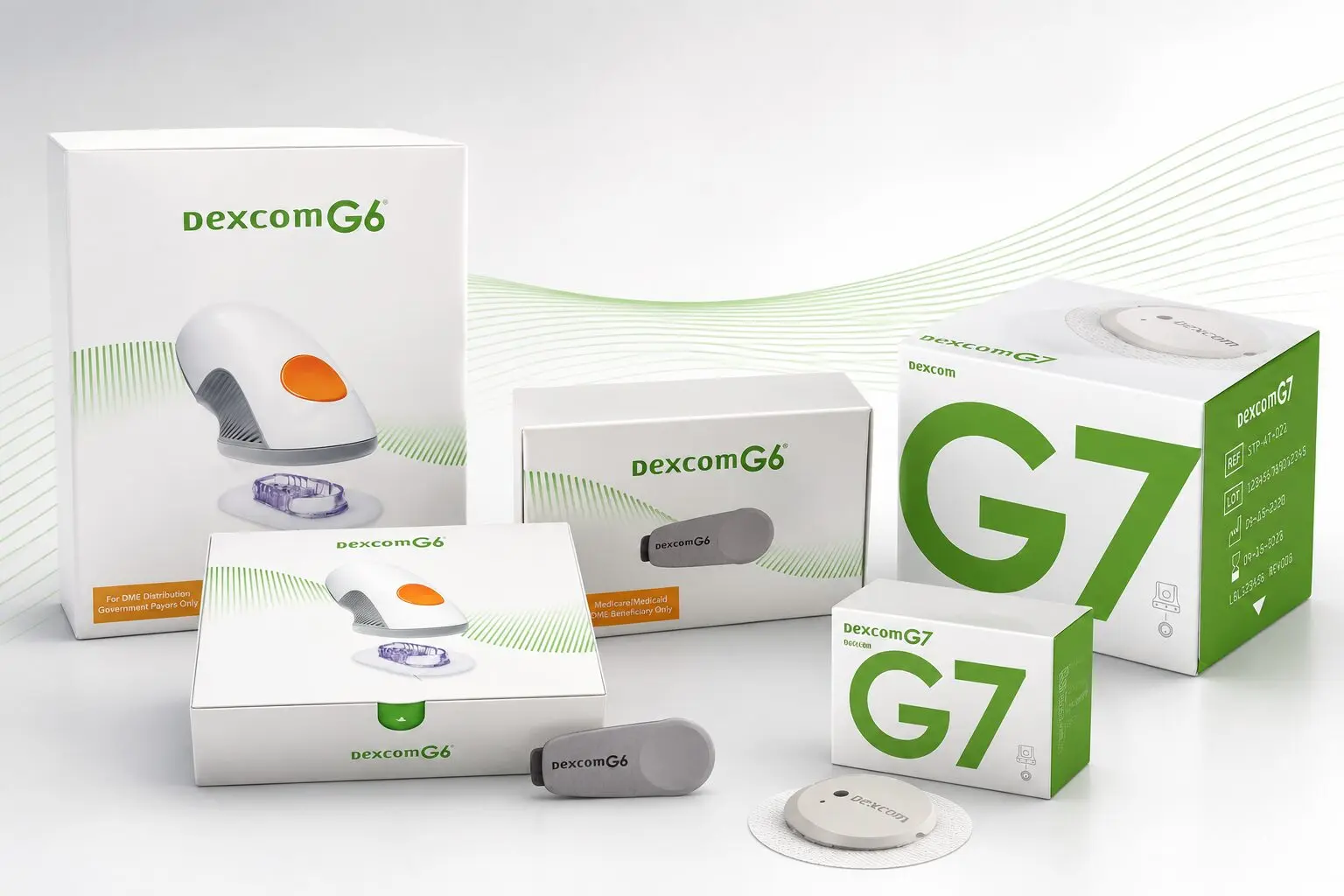
Dexcom G6 and Dexcom G7 are both real-time continuous glucose monitoring systems, but the G7 introduces a smaller all-in-one design, a much shorter warm-up period, and a 12-hour sensor replacement grace period. The G6 uses separate sensor and transmitter components, while the G7 combines them into one wearable. Both provide automatic glucose readings and support remote monitoring when used with compatible devices.
For shoppers comparing Dexcom G6 vs G7, the right option depends on factors such as product availability, device compatibility, sensor design, warm-up time, app features, and the features that matter most to you.
Ready to compare Dexcom options? Browse our available Dexcom supplies and check current product availability before purchasing.
Dexcom G6 vs G7: What Has Changed?
Dexcom G7 is the newer generation of Dexcom’s personal CGM system. It keeps several core features associated with the G6 while introducing changes to the sensor design, warm-up process, app, receiver, and alerts.
The most noticeable differences include:
- G7 is approximately 60% smaller than G6.
- G7 uses an all-in-one sensor and transmitter.
- G7 has a 30-minute warm-up, compared with 2 hours for G6.
- G7 provides a 12-hour grace period when replacing a finished sensor.
- G7 has a redesigned mobile app with Dexcom Clarity integration.
- G7 has updated alert settings.
- G7 has a redesigned optional receiver.
- G7 uses smaller plastic components and packaging than G6.
These changes make the G7 particularly different in day-to-day setup and convenience, while the G6 remains familiar to people who already use it.
Dexcom G6 vs G7: Side-by-Side Comparison
|
Feature |
Dexcom G6 |
Dexcom G7 |
|
Sensor design |
Separate sensor and transmitter components |
All-in-one sensor and transmitter |
|
Approximate sensor size |
1.2 × 1.8 inches |
1.07 × 0.94 inches |
|
Warm-up |
2 hours |
Less than 30 minutes |
|
Sensor wear duration |
Up to 10 days |
Up to 10 days |
|
Grace period |
No 12-hour grace period |
Up to 12 hours |
|
Routine calibration |
None required |
None required |
|
Real-time readings |
Yes |
Yes |
|
Remote monitoring |
Yes |
Yes |
|
Mobile app |
Dexcom G6 app |
Redesigned Dexcom G7 app |
|
Alerts |
Advanced alert features |
Updated alert settings |
|
Receiver |
Compatible receiver available |
Redesigned optional receiver |
Dexcom’s current comparison information confirms the differences in sensor size, warm-up time, grace period, calibration, wear duration, alerts, and receiver design.
One important point: G6 components cannot simply be reused with the G7 system. Dexcom states that G6 sensors, transmitters, and receivers are not compatible with the G7 app, sensors, or receiver.
Dexcom G6 vs G7: Sensor Size and Design
The physical design is one of the easiest differences to notice.
Dexcom describes the G7 as approximately 60% smaller than the G6 and as an all-in-one sensor and transmitter. The G6 uses separate sensor and transmitter components.
This difference may appeal to shoppers who prefer:
- A smaller wearable
- Fewer separate components
- A simpler sensor setup
- A more compact design
The G6, meanwhile, may still make sense for someone who already has a compatible G6 setup and remaining supplies.
Dexcom G6 vs G7: Warm-Up Time
Warm-up time is another major difference between the two systems.
Dexcom G6
The G6 has a 2-hour warm-up period.
Dexcom G7
The G7 can complete warm-up in less than 30 minutes.
That can make a noticeable difference when starting a replacement sensor.
The G7 also includes a 12-hour grace period for replacing a finished sensor, which can make the transition between sensor sessions more flexible.
Dexcom G6 vs G7: Accuracy
Accuracy is an important consideration when comparing CGM systems.
Dexcom’s current U.S. information reports an adult MARD of 8.2% for Dexcom G7. MARD, or mean absolute relative difference, is one statistical measure used to describe CGM accuracy. (Dexcom)
For Dexcom G6, the American Diabetes Association Consumer Guide lists an adult MARD of 9.8%. (American Diabetes Association)
These figures come from product-specific performance data and different sources, so they should not be interpreted as a direct head-to-head guarantee of the exact performance every user will experience.
What should shoppers take from this?
The G7 represents a newer sensor platform with updated performance data, but choosing between G6 and G7 should not depend on one accuracy number alone.
Other factors include:
- Sensor placement
- Proper application
- Device compatibility
- Connectivity
- Following product instructions
- The specific system and version being used
If a CGM reading does not match your symptoms or expectations, follow the manufacturer’s guidance for confirming the reading before making treatment decisions.
Dexcom G6 vs G7: Calibration
Neither the G6 nor the G7 requires routine manual calibration when used according to the manufacturer’s system instructions.
Dexcom’s provider comparison lists no calibration required for both the G6 and G7.
The two systems do use different setup processes, however.
The G7 uses a four-digit pairing code associated with the new sensor, while the G6 uses its own sensor-code and transmitter setup.
This is another reason not to assume that G6 and G7 components can be mixed.
Dexcom G6 vs G7: App and Alerts
The G7 introduces a redesigned mobile app with Dexcom Clarity integration and updated alert settings.
The G6 also provides automatic glucose readings, alerts, remote monitoring, and access to Dexcom’s connected ecosystem.
Some of the G7’s updated features include:
- Redesigned mobile app
- Dexcom Clarity integration
- Updated alert settings
- Delay 1st High Alert
- Silent Mode
- Redesigned optional receiver
If app experience and alert customization are important to you, the G7 offers the newer platform.
Dexcom G6 vs G7: Compatibility
Compatibility is something shoppers should check before purchasing.
A phone that works with the G6 is not automatically guaranteed to work with the G7. Dexcom says that many current Apple and Android devices work with both systems, but compatibility can differ between the two. Dexcom also continues updating its compatibility lists as devices are tested.
Before ordering, check:
- Your smartphone model
- Your phone’s operating system
- Whether you want to use a receiver
- Any connected diabetes-management device you use
- The current compatibility information for the exact Dexcom system
The G6 and G7 also use different receivers. Dexcom states that a G6 receiver is not compatible with G7 sensors and that the G7 uses a redesigned optional receiver.
Can You Use Dexcom G6 Components With G7?
No.
Dexcom states that G6 sensors, transmitters, and receivers are not compatible with the G7 system. The G7 uses its own sensor, app, and receiver setup.
This is an important point to check if you’re moving from G6 to G7.
Before purchasing, make sure the product you are ordering matches the system you currently use or plan to use.
Dexcom G6 vs G7: Cost Considerations
Cost is naturally part of the Dexcom G6 vs G7 comparison, but there isn’t one universal price that applies to every shopper.
Current cost can vary based on:
- Retailer
- Product package
- Quantity
- Product availability
- Current retailer offers
- Whether additional equipment is needed
For that reason, avoid relying on an old dollar amount from an article or search result.
Instead, compare the current product listing and total purchase requirements.
When comparing the two systems, consider:
- What is included in the package?
- How many sensors are included?
- Is a receiver needed?
- Is your current smartphone compatible?
- Is the exact model currently available?
- Are you comparing equivalent package sizes?
This approach gives you a more useful picture than comparing one outdated price against another.
If you’re also comparing where to purchase diabetic supplies, you can review our guide to affordable diabetic supplies near you for additional shopping considerations.
Is Dexcom G6 Still Available in 2026?
This is an important consideration for anyone researching Dexcom G6 vs G7 today.
Dexcom stopped manufacturing the Dexcom G6 CGM System after July 1, 2026. Dexcom also says that supplies may continue to be available through local pharmacies or medical distributors for a period after that date, but availability cannot be guaranteed.
This does not mean Dexcom has stopped manufacturing all of its CGM products in the United States. The statement specifically concerns the G6 product line.
For someone shopping for a new Dexcom system in 2026, this makes current G6 availability an important consideration.
The G7 is the newer generation, and Dexcom is directing users toward G7 systems as it phases out G6.
Dexcom G6 vs G7: Which One Should You Choose?
There isn’t one answer that works for everyone.
Choose G7 if you prioritize:
- Smaller sensor size
- All-in-one design
- Faster warm-up
- 12-hour sensor replacement grace period
- Updated app
- Updated alert options
- Current product availability
G6 may still be relevant if:
- You already use G6
- You have compatible G6 equipment
- You have remaining G6 supplies
- Your preferred source still has available G6 inventory
- Your existing setup depends on G6 compatibility
However, because Dexcom stopped manufacturing the G6 after July 1, 2026, shoppers considering a new system should factor future availability into the decision.
What Should You Check Before Buying a Dexcom CGM?
Before ordering either system, use this checklist.
1. Confirm the exact model
Make sure the product listing clearly says Dexcom G6 or Dexcom G7.
Don’t assume that a listing simply described as “Dexcom CGM” includes the newest model.
2. Check smartphone compatibility
Confirm that your phone and operating system are compatible with the exact Dexcom system you plan to purchase.
3. Check what is included
Look at the package contents and determine whether you need a receiver or other compatible equipment.
4. Review the expiration information
Check the expiration information on the product before ordering, particularly when buying supplies that may have been stored for some time.
5. Compare equivalent packages
If you’re comparing G6 and G7 listings, make sure you’re comparing similar quantities and package configurations.
6. Consider warm-up time
If minimizing the sensor warm-up period is important to you, remember that G7 has a much shorter warm-up than G6.
7. Consider availability
Because G6 manufacturing ended after July 1, 2026, check whether the exact G6 product you want is currently available before planning a long-term supply strategy.
8. Check your existing setup
If you already use G6, confirm whether your connected devices and accessories will work with the G7 before switching.
Common Mistakes When Comparing Dexcom G6 vs G7
Mistake 1: Assuming G7 is simply a smaller G6
Although both systems provide continuous glucose readings, the G7 has different hardware, a different sensor/transmitter design, a different app, and a different receiver.
Mistake 2: Comparing only the listed price
A price by itself doesn’t tell you whether two listings are equivalent.
Check package size, included components, availability, and compatibility.
Mistake 3: Assuming G6 components work with G7
They don’t. G6 sensors, transmitters, and receivers are not compatible with G7.
Mistake 4: Ignoring smartphone compatibility
A phone compatible with G6 may not necessarily be compatible with G7.
Always check the current compatibility list before purchasing.
Mistake 5: Ignoring G6 availability changes
G6 manufacturing stopped after July 1, 2026, so current inventory and future availability matter when making a purchasing decision.
Mistake 6: Choosing based on one specification alone
Warm-up time, size, accuracy data, app features, compatibility, availability, and personal preferences can all matter.
Frequently Asked Questions
Is Dexcom G7 better than G6?
The G7 offers several newer features, including a smaller all-in-one design, a shorter warm-up, a 12-hour grace period, a redesigned app, and updated alert settings. Whether it is the better choice depends on your compatibility, availability, existing setup, and preferred features.
Is Dexcom G7 more accurate than G6?
Dexcom’s current U.S. information reports an adult MARD of 8.2% for Dexcom G7. The American Diabetes Association Consumer Guide lists an adult MARD of 9.8% for Dexcom G6. Because these figures come from different product-specific sources and should not be treated as a direct head-to-head guarantee, shoppers should consider the broader feature set as well as accuracy data.
How long does Dexcom G6 take to warm up?
Dexcom G6 has a 2-hour warm-up period.
How long does Dexcom G7 take to warm up?
Dexcom G7 can complete its warm-up in less than 30 minutes.
How long does each Dexcom G6 and G7 sensor last?
Both the standard G6 and standard G7 have a sensor wear duration of up to 10 days. The G7 additionally provides a 12-hour grace period for changing a finished sensor.
Is Dexcom G7 smaller than G6?
Yes. Dexcom describes the G7 as approximately 60% smaller than the G6. The current provider comparison lists G7 at approximately 1.07 × 0.94 inches and G6 at approximately 1.2 × 1.8 inches.
Does Dexcom G7 require calibration?
Dexcom’s current comparison lists no calibration required for both G6 and G7.
Can I use my Dexcom G6 receiver with G7?
No. Dexcom states that G6 receivers are not compatible with G7 sensors. The G7 has a redesigned optional receiver.
Can I use Dexcom G6 sensors with the G7 app?
No. Dexcom states that G6 sensors, transmitters, and receivers are not compatible with the G7 app, sensors, or receiver.
Can I still buy Dexcom G6 in 2026?
Dexcom stopped manufacturing the Dexcom G6 on July 1, 2026. Some G6 supplies may still be available through pharmacies or medical distributors, but Dexcom does not guarantee availability after that date. If you’re considering G6, check current availability before purchasing.
Should I switch from Dexcom G6 to G7?
If you’re considering a switch, compare your current setup with the G7’s compatibility, sensor design, warm-up time, app features, alerts, and availability. Since G6 manufacturing ended after July 1, 2026, availability is also an important factor for anyone planning future purchases.
Dexcom G6 vs G7: Key Takeaways
The main differences between Dexcom G6 vs G7 are easy to summarize:
- G7 is approximately 60% smaller than G6.
- G7 uses an all-in-one sensor and transmitter.
- G6 has a 2-hour warm-up; G7 has a warm-up of less than 30 minutes.
- G7 offers a 12-hour grace period when replacing a finished sensor.
- Both systems provide real-time glucose readings.
- Both support remote monitoring.
- Neither requires routine calibration according to Dexcom’s current comparison.
- G6 and G7 use different receivers and components.
- Smartphone compatibility should be checked before purchasing.
- G6 manufacturing ended after July 1, 2026, although remaining supplies may continue to be available for a period.
For most shoppers, the decision should come down to current availability, compatibility, desired features, and how the system fits into their existing setup rather than relying on one specification alone.
Final Thoughts
The Dexcom G6 vs G7 comparison is ultimately a comparison between a familiar earlier-generation system and a newer platform designed around a smaller all-in-one sensor, faster warm-up, updated alerts, and a redesigned app.
The G7 offers several meaningful changes, while G6 may still be relevant for people who already have compatible equipment or remaining supplies. However, Dexcom stopped manufacturing the Dexcom G6 on July 1, 2026, making current availability an increasingly important consideration.
Before buying, verify the exact model, current availability, package contents, smartphone compatibility, and any connected-device requirements. Taking a few minutes to compare those details can help you choose the Dexcom system that best fits your needs.
For more guidance on finding convenient options for diabetic supplies, you can also explore our guide to affordable diabetic supplies near you.
If you’re ready to compare available diabetic supply options, Affordable Diabetic Direct makes it easier to explore products and find options that fit your needs and budget. Browse our available diabetic supplies and explore affordable options today.